Showing posts with label python. Show all posts

2008-08-28

Color Correction


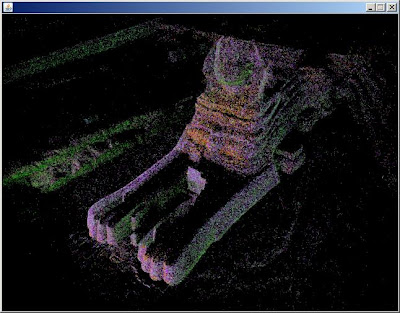
I have the colors figured out now: I was forgetting to byteswap the two color bytes, and after that the rgb elements line up nicely. And it's 5:6:5 bits per color channel rather than 4 as I thought previously, thanks to Marvin who commented below.

The sphinx above looks right, but earlier the boxer shown below looked so wrong I colored it falsely to make the video:


The Boxer - Photosynth Export from binarymillenium on Vimeo.

But I've fixed the boxer now:


The python script is updated with this code:


bin.byteswap()
red = (bin[0] >> 11) & 0x1f
green = (bin[0] >> 5) & 0x3f
blue = (bin[0] >> 0) & 0x1f

2008-08-27

Exporting Point Clouds From Photosynth


Since my last post about photosynth I've revisited the site and discovered that the pictures can be toggled off with the 'p' key, and the viewing experience is much improved given there is a good point cloud underneath. But what use is a point cloud inside a browser window if it can't be exported to be manipulated into random videos that could look like all the lidar videos I've made, or turned into 3D meshes and used in Maya or any other program?

Supposedly export will be added in the future, but I'm impatient like one of the posters on that thread so I've gone forward and figured out my own export method without any deep hacking that might violate the terms of use.

Using one of those programs to intercept 3D api calls might work, though maybe not with DirectX or however the photosynth browser window is working. What I found with Wireshark is that http requests for a series of points_m_n.bin files are made. The m is the group number, if the photosynth is 100% synthy then there will only be one group labeled 0. The n splits up the point cloud into smaller files, for a small synth there could just be points_0_0.bin.

Inside each bin file is raw binary data. There is a variable length header which I have no idea how to interpret, sometimes it is 15 bytes long and sometimes hundreds or thousands of bytes long (though it seems to be shorter in smaller synths).

But after the header there is a regular set of position and color values each 14 bytes long. The first 3 sets of 4 bytes are the xyz position in floating point values. In python I had to do a byteswap on those bytes (presumably from network order) to get them to be read in right with the readfile command.

The last 2 bytes is the color of the point. It's only 4-bits per color channel, which is strange. The first four bits I don't know about, the last three sets of 4 bits are red, blue, and green. Why not 8-bits per channel, does the photosynth process not produce that level of precision because it is only loosely matching the color of corresponding points in photos? Anyway as the picture above shows I'm doing the color wrong- if I have a pure red or green synth it looks right, but maybe a different color model than standard rgb is at work.

I tried making a photosynth of photos that were masked to be blue only- and zero synthiness resulted - is it ignoring blue because it doesn't want to synth up the sky in photos?

Anyway here is the python script for interpreting the bin files.

The sceneviewer (taken from the Radiohead sceneviewer) in that source dir works well for displaying them also.

Anyway to repeat this for any synth wireshark needs to figure out where the bin files are served from (filter with http.request), and then they can be downloaded in firefox or with wget or curl, and then my script can be run on them, and processing can view them. The TOC doesn't clearly specify how the point clouds are covered so redistribution of point clouds, especially those not from your own synths or someone who didn't CC license it, may not be kosher.

2008-08-24

More python pcap with pcapy

After running into pcap files several hundreds of megabytes in size that caused wireshark to crash when loaded, I returned to trying to make python work with the source pcap file:


import pcapy

vel = pcapy.open_offline('unit 46 sample capture velodyne area.pcap')

vel
Reader object at 0xb7e1b308

pkt = vel.next

pkt
built-in method next of Reader object at 0xb7e1b308


What is a Reader object, and a built-in method of it? Why are the addresses the same?

try

pkt = vel.next()

type(vel)
type 'tuple'

vel[1]


'\xff\xff\xff\xff\xff\xff\x00\x00\x00\x00\x00\x00\x08\x00E\x00\x04\xd2
\x00\x01\x00\x00\x80\x11\xad\x9f\xc0\xa8\x03+\xc0\xa8\x03\xff\x01\xbb
\t@\x04\xbe\x00\x00\xff\xddz\x13\xee
...
\x00\x00\x10\xd63Md\xc2\xff\x00\x00\x0fp\x07v25b'


So that's just the problem I was running into before: '\xff' is an ascii representation of binary data that's really 0xff. But I'm given it in ascii- I can't index into this and get a specific 8-bit 0-255 binary value, I get a '\'. Do I have to write something that goes through this and reinterpets the ascii-ized hex back into real hex?

Also I note the ff dd that marks the beginning of the data frame is there but not at the beginning- so there are other parts of the packet here I need to get rid of. Is this where I need Impacket?

import impacket
from impacket.ImpactDecoder import EthDecoder

decoder = EthDecoder()
b = decoder.decode(a)
Traceback (most recent call last):
File "stdin", line 1, in ?
File "/var/lib/python-support/python2.4/impacket/ImpactDecoder.py", line 38, in decode
e = ImpactPacket.Ethernet(aBuffer)
File "/var/lib/python-support/python2.4/impacket/ImpactPacket.py", line 340, in __init__
self.load_header(aBuffer)
File "/var/lib/python-support/python2.4/impacket/ImpactPacket.py", line 255, in load_header
self.set_bytes_from_string(aBuffer)
File "/var/lib/python-support/python2.4/impacket/ImpactPacket.py", line 59, in set_bytes_from_string
self.__bytes = array.array('B', data)
TypeError: an integer is required

oops

b = decoder.decode(a[1])
print b
Ether: 0:0:0:0:0:0 -> ff:ff:ff:ff:ff:ff
IP 192.168.3.43 -> 192.168.3.255
UDP 443 -> 2368

ffdd 7a13 ee09 3cbe 093f 1811 2b1f 1020 ..z.....?..+..
0a0a 63ac 0848 d708 53ea 085b 0000 1bc0 ..c..H..S..[....
0a35 0c09 425b 0936 000d 2e44 0d2f 120b .5..B[.6...D./..
4f5e 0b30 200f 3c4e 0e50 c30b 46c7 0b4d O^.0 .

The decode makes a nice human readable text of the packet, but not what I want.

Here is a different tack- by looking in the Impacket.py source I found how to do this which converts that annoying ascii back to real bytes, which is the only real issue:

mybytes = array.array('B', vel[1])

mybytes is of size 1248, so there appear to be 42 extra bytes of unwanted ethernet wrapper there- why not just index into mbytes like mybytes[42:] and dump that to a binary file?

I don't know about the dumping to binary file (print mybytes prints it in ascii, not binary)- but I could easily pass that array straight into the velodyne parsing code- and this skips the intermediate file step, saving time and precious room on my always nearly full laptop hd.

So here is the final result, which produce good CSVs I was able to load with my 'velosphere' Processing project to create 360 degree panoramas from the lidar data:

Next I need a way to write pngs from python, and I could eliminate the CSVs & Processing step.

2008-07-29

Velodyne Lidar Sample Data: Getting a .pcap into Python

Velodyne has provided me with this sample data from their HDL-64E lidar.

Instead of data exported from their viewer software, it's a pcap captured with Wireshark or a another network capture tool that uses the standard pcap format.

Initially I was trying to extract the lidar packets with libpcap and python, using pcapy or similar, and went through a lot of trouble getting the pcap library to build in the cygwin environment. Python and libpcap were able to load the data from the pcap, but rendered the binary into a long string with escape codes like '\xff'.

I then discovered that Wireshark has a function called 'follow udp stream'- right-click on the data part of a packet in Wireshark and then export as 'raw'. The exported data doesn't preserve division between packets any longer, but since each is of a consistent length (1206 bytes) it's easy to parse.


Python does work well for loading binary data from file:


import array

f = open('data.raw') # the data exported from wireshark in the raw format

bin = array.array('B') # setup an array of typecode unsigned byte

bin.fromfile(f, 1206) # each packet has 1206 bytes of data


The contents of bin now have 1206 bytes of data that looks like this:


>>> bin
array('B', [255, 221, 33, 39, 5, 9, 67, 178, 8, 116, 160, 13, 126, 222, 13, 63, 217, 8, 162, 204, ...


The 'B' element doesn't prevent indexing into the real data with bin[0] and getting 255 and so on.

The first two bytes indicate whether the data is from the upper or lower array, and the 33 39 is interpreted to mean that the reading was taken when the sensor head was rotated to (39*255+33)/100 or 99.78 degrees.

For 32 times after those first two bytes there are pairs of distance bytes followed by single intensity bytes, and then it starts over for a total of 12 times... and there are 6 more bytes with information that is unnecessary now. See here for what I currently have for parsing the raw file, later I will get into add the per laser calibration data.